Every photo app wants your photos.
Google Photos backs them up to its servers and uses them to train its AI models. Journi uploads your entire camera roll to make a photo book. iCloud syncs everything to Apple’s cloud by default. Even apps that seem simple often require you to create an account before you can do anything.
For most people, that trade-off feels fine. But for a growing number of us — parents who don’t want their kids’ faces in a tech company’s training dataset, privacy-conscious users who’ve read one too many data breach headlines, or anyone who simply thinks their memories are theirs — it’s not.
So what are your options if you want a photo app that actually keeps your photos on your phone?
This guide breaks down what “private” really means for a photo app, which popular apps fall short, and which ones genuinely respect your data in 2026.
What makes a photo app truly “private”?
Not all privacy claims are equal. Before comparing apps, it helps to know what to look for.
A genuinely private photo app should meet all four of these criteria:
1. On-device processing. Any AI features — face recognition, smart search, auto-grouping, story generation — should run on your phone’s own chip, not on a remote server. If the app needs to send your photo to a server to analyse it, your photo has already left your device.
2. No cloud upload required. Backup and sync features are optional and opt-in, not mandatory for the app to function. You should be able to use the app’s full feature set with no internet connection at all.
3. No account required. If an app requires you to create an account before using it, that account is a data trail. A truly private app lets you use it anonymously, with no login and no email address handed over.
4. Transparent data practices. The app should clearly state what data it collects (crash reports, purchase receipts) and what it does not collect (photos, narrative text, personal details). No vague “we may share with partners” language.
Keep these four criteria in mind as we look at the most popular options.
Why most popular photo apps aren’t truly private
This isn’t meant as an attack on apps that millions of people love. It’s honest context — because if you’re searching for a private photo app, you deserve to know exactly what the trade-offs are.
Google Photos is the world’s most popular photo app, and for good reason — its search is extraordinary, its AI features are genuinely impressive, and 15 GB of free storage is hard to argue with. But Google’s terms of service are clear: your photos are used to improve Google’s AI and services. Face recognition, object detection, and scene understanding all run on Google’s servers. If you’re not paying, your data is part of the product. For many users that’s an acceptable trade. For others, it’s a dealbreaker.
Apple iCloud Photos is a better privacy story than Google — Apple has made strong public commitments to not using your photo content for advertising. But iCloud is still cloud storage. Your photos live on Apple’s servers, accessible (in theory) to Apple, and subject to government data requests. iCloud is private in the corporate sense, but not in the “stays on my device” sense.
Journi and LifeCache are genuinely delightful AI photo book apps. But their core feature — turning your photos into beautiful printed books or video stories — requires uploading your camera roll to their servers. That’s where the AI processing happens. If you’re making a book of your child’s first year, those photos are leaving your phone.
Day One is a beautifully designed journaling app with great photo integration and end-to-end encryption. But it’s primarily a cloud-synced app — your journal entries (and photos) live on Day One’s servers, encrypted but still remote.
None of these apps are doing anything sinister. But they’re not the right fit if your priority is keeping your photos on your device.
The best private photo apps in 2026 — compared
Here are the strongest options for users who want genuine on-device privacy.
Mylio Photos
Mylio is a powerful privacy-first photo organiser that runs entirely on your devices. It syncs between your phone, desktop, and external drives via peer-to-peer — no Mylio server ever sees your photos. Its AI features (face recognition, smart tags, search) all run locally. It handles libraries of 500,000+ photos without breaking a sweat.
The catch: Mylio is an organiser, not a storyteller. It doesn’t write narratives, generate memory videos, or create anything you’d want to share with a grandparent. It’s excellent for photographers and power users who want control over a large library. Less ideal if you want your memories to feel alive.
Best for: Power users, photographers, large libraries.
Privacy: Excellent — fully on-device.
Stories/videos: None.
Slidebox
Slidebox is a simple, fast photo organiser focused on helping you quickly sort and delete photos from your camera roll. It runs locally, requires no account, and does exactly what it says. But it’s a utility, not a memory app — there’s no AI, no narrative, no video creation.
Best for: Clearing camera roll clutter quickly.
Privacy: Good — local only.
Stories/videos: None.
Day One (with local storage)
Day One does offer a local storage option — you can keep your journal on-device only, without syncing to their cloud. If you configure it this way, it’s a genuinely private photo journal. The AI writing prompts are helpful, and the design is beautiful. The limitation is that it’s text-first: you write the story, and photos support it. It doesn’t automatically turn a set of photos into a narrative.
Best for: People who already journal and want photos integrated.
Privacy: Good (with local mode enabled).
Stories/videos: None.
MemoBloom ⭐
MemoBloom is the only app in this list that combines full on-device privacy and AI-generated memory stories. It’s an iPhone and Android app that takes a set of photos, processes them entirely on your phone’s chip, and produces a warm, narrated memory — complete with music, cinematic transitions, and semantic search — without a single photo ever leaving your device.
There’s no account. No cloud upload. No tracking. No ads. The AI that reads your photos and writes your story runs 100% locally, which means it works offline too.
Best for: Anyone who wants private, AI-narrated photo memories.
Privacy: Excellent — fully on-device, no account, works offline.
Stories/videos: AI narratives, animated slideshows, Memory Films.
| Mylio | Slidebox | Day One | MemoBloom | |
|---|---|---|---|---|
| On-device AI | ✔ | ✘ | ✘ | ✔ |
| No account needed | ✔ | ✔ | ✘ | ✔ |
| No cloud upload | ✔ | ✔ | Opt-in | ✔ |
| AI-written stories | ✘ | ✘ | ✘ | ✔ |
| Memory videos | ✘ | ✘ | ✘ | ✔ |
| Works offline | ✔ | ✔ | Partial | ✔ |
| Free tier | ✔ | ✔ | Trial only | ✔ |
MemoBloom: the only private photo app that tells your story
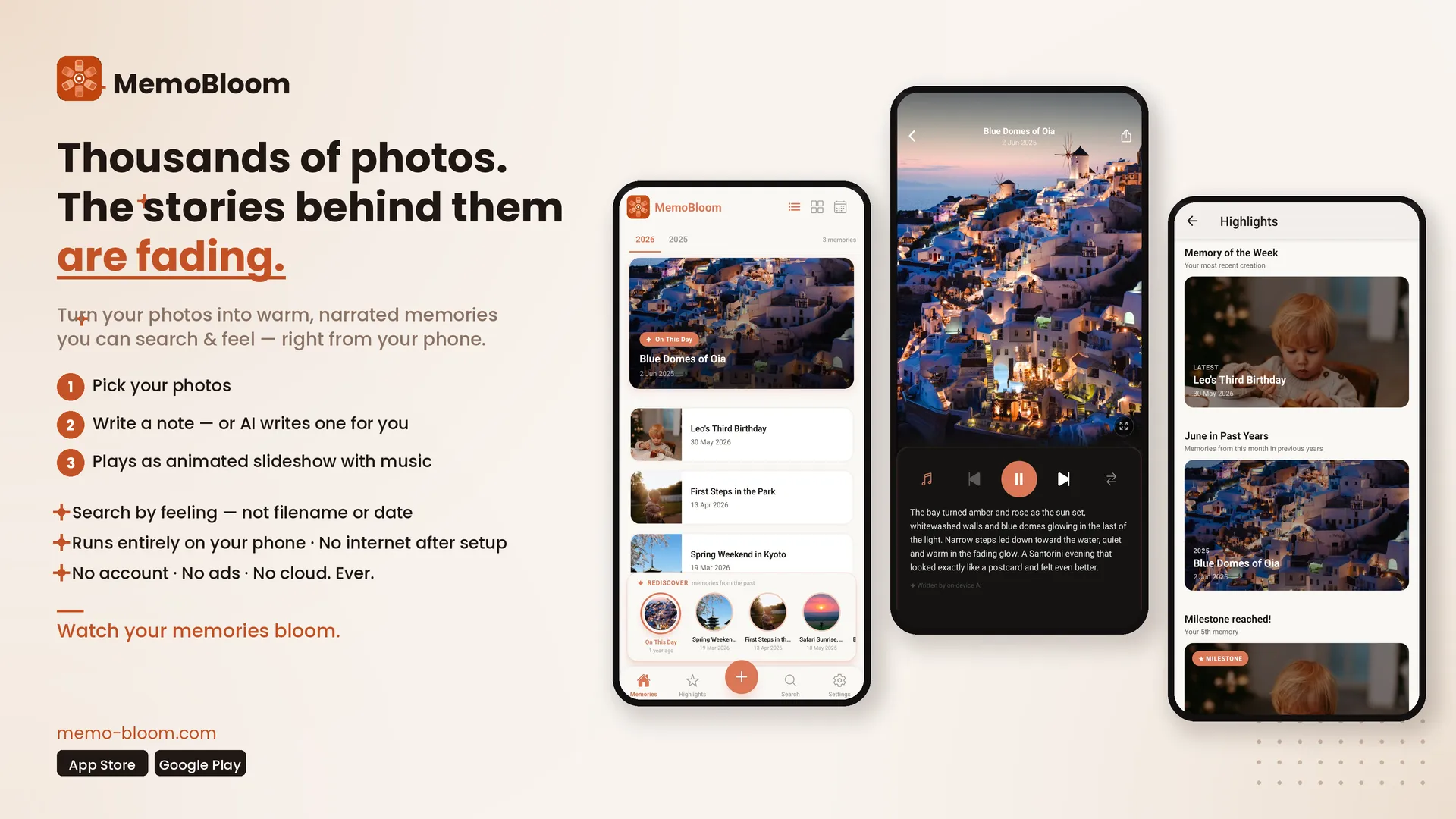
Most photo apps ask you to do the work. You scroll, you sort, you choose, you arrange. MemoBloom flips that. You pick a set of photos — a birthday, a holiday, an ordinary Tuesday that somehow mattered — and the app does the rest.
Here’s how it works:
1. Pick your photos. Select 3 to 15 photos from your camera roll. A trip, a milestone, a pet moment, anything.
2. Add your story — or let the AI write one. Write the full story yourself in your own words, add a short note to guide the AI, or leave it blank and let it surprise you. On-device AI — running entirely on your phone’s chip, with no internet connection required — reads the photos and crafts a warm personal narrative either way. (We walk through this step by step in our guide on how to turn your camera roll into a memory story.)
3. Watch it bloom. Your memory plays back as an animated slideshow with cinematic Ken Burns motion, music from a built-in library, and the AI-written story as narration. You can export it as a Memory Film — a shareable video — or keep it private in the app.
Beyond one-off memories, MemoBloom adds a few features that turn it into a genuine long-term memory companion:
- Semantic search — type “beach birthday” or “snow with the kids” and the AI finds the closest match in your library, without you ever having to tag or organise anything
- On This Day — a daily reminder of where you were exactly a year ago, no algorithm, no ads, just your own life played back to you
- Free Up Space — create a memory from a set of photos, then safely delete the originals from your camera roll. Your story is preserved; your storage is freed
The pricing is straightforward. The free tier gives you up to 10 memories with full AI features and watermarked Memory Films. Pro unlocks unlimited memories, a full music library, and clean video exports for $2.49/month or $11.99/year. There’s also a one-time Lifetime option at $39.99 — early member pricing while it lasts.
Who is MemoBloom for?
Parents are the most natural fit. Your child’s first year alone generates thousands of photos — first steps, first words, first haircut, first day of school. MemoBloom turns those moments into stories you’ll actually revisit, without uploading your child’s face to a tech company’s server.
Privacy-conscious photo app users
Users who’ve moved away from Google Photos or disabled iCloud sync find MemoBloom fills the gap that organised-but-didn’t-narrate tools like Mylio leave open. You get the privacy you wanted and the storytelling you didn’t know you were missing.
People with a big backlog — the ones with 40,000 unsorted photos they’ve been meaning to do something with for three years — find the “pick any group of photos and watch a story appear” approach less overwhelming than anything that asks them to organise first.
And honestly, anyone who’s ever pulled up their phone at a family dinner to show someone a memory, only to spend four minutes scrolling to find it, will appreciate what happens when you can just search “Lisbon trip” and it’s right there.
Frequently asked questions
Does MemoBloom upload my photos?
No. MemoBloom’s AI runs entirely on your device. Your photos never leave your phone — not to MemoBloom’s servers, not anywhere. The app processes everything locally, which is also why it works fully offline once set up.
Does MemoBloom work without an internet connection?
Yes. Once the app is installed, everything works offline. The only network calls are for model updates (downloaded occasionally in the background) and in-app purchases. Creating memories, searching your library, and watching Memory Films all work with no connection.
Is MemoBloom free?
MemoBloom has a free tier that lets you create up to 10 memories with full AI features, semantic search, and watermarked Memory Films — no credit card required. Pro unlocks unlimited memories and clean video exports for $2.49/month or $11.99/year.
What’s the difference between MemoBloom and Google Photos?
Google Photos is a cloud storage and organisation tool — your photos are backed up to Google’s servers, where AI analyses them remotely. MemoBloom is an on-device memory storytelling app — your photos stay on your phone, and a local AI turns them into narrated stories. They serve different needs. If you want free cloud backup with powerful search, Google Photos is hard to beat. If you want to turn your photos into stories without ever uploading them, MemoBloom is the only app that does both.
The bottom line
If all you want is to keep your photos organised and backed up, Google Photos and iCloud will serve you well. They’re fast, free, and deeply integrated into the devices most people already use.
But if you want your memories to actually mean something — to turn a set of photos into a story you can share, revisit, and search through years from now — without handing your most personal moments to a cloud server, there’s only one app that does that.
MemoBloom is free to download and takes about two minutes to create your first memory. Your photos stay on your phone. Your story stays yours.
If you're weighing this as a longer-term family archive rather than a one-off, our guide to preserving family memories digitally goes deeper into what that actually takes.
Try MemoBloom free
Your photos stay on your phone. Your story stays yours.
MemoBloom is an iOS and Android app. All AI processing runs on-device. No account required. No photos are uploaded or stored externally.